DreamFactory MCP Server Setup
Connect AI agents directly to your enterprise databases and file storage using Model Context Protocol (MCP). Give ChatGPT, Claude, Cursor, and other AI clients secure, controlled access to live data.
Official Documentation
This module is based on DreamFactory's official MCP documentation. For the latest reference, see: MCP Server Docs | Custom Login Page | MCP FAQ
🔌 What is Model Context Protocol (MCP)?
Model Context Protocol (MCP) is an open standard that enables AI applications to connect securely with external data sources and tools. Think of it as the USB for AI, a universal connector between AI agents and the systems they need to interact with.
Instead of building custom integrations for every AI platform, MCP provides a standardized way for AI models like Claude, GPT, and others to:
- Discover available tools: AI learns what operations it can perform
- Execute operations: Query databases, call APIs, perform actions
- Receive structured responses: Get data in formats optimized for AI reasoning
MCP is to AI what USB is to Peripherals
Before USB, every device needed its own proprietary connector. MCP aims to be the universal connector between AI models and data sources. DreamFactory's MCP server implementation makes your databases instantly accessible to any MCP-compatible AI client.
What You Will Learn
- Understanding MCP architecture and components
- Enabling and configuring DreamFactory's MCP server
- Exposing database services securely to AI agents
- Connecting Python applications and Claude Desktop
- Best practices for safe AI-database interactions
- Troubleshooting common MCP issues
🚀 Why MCP Matters for Enterprise AI
Security First
All access goes through DreamFactory's AI Data Gateway. No direct database connections from AI.
Instant Integration
Connect any MCP-compatible AI to your databases without custom code.
Full Observability
Every AI query is logged, audited, and traceable. Complete visibility.
Traditional AI Integration vs. MCP
| Aspect | Traditional Approach | MCP with DreamFactory |
|---|---|---|
| Connection | Custom code per database | Standardized protocol |
| Security | Varies, often weak | Centralized, enforced |
| Schema Discovery | Manual documentation | Automatic via tools |
| Rate Limiting | Custom implementation | Built-in controls |
| Audit Trail | Often missing | Complete logging |
| Multi-Database | Separate integrations | Unified interface |
Never Give AI Direct Database Access
Without a security layer like DreamFactory, AI agents could execute arbitrary SQL, access sensitive data, or cause unintended mutations. MCP through DreamFactory ensures every operation is validated, logged, and constrained by your security policies.
📋 Prerequisites
| Requirement | Version | Purpose |
|---|---|---|
| DreamFactory | 7.4 or higher | MCP server capability |
| Database Service | Any supported DB | Data source to expose |
| MCP Service | Created in AI tab | Auto-generates OAuth credentials |
| AI Client | MCP-compatible | ChatGPT, Claude Desktop, Cursor, etc. |
Supported Databases
MCP works with any database DreamFactory supports: MySQL, PostgreSQL, SQL Server, Oracle, MongoDB, Snowflake, and 20+ others. If DreamFactory can connect to it, AI can query it via MCP.
🏗️ System Architecture
Understanding the data flow is crucial for proper configuration and troubleshooting. Here's how MCP connects AI to your databases:
Communication Flow
- Initialize Session: AI client sends a POST to
/mcp/{service-name}to initialize a session. The response includes anMCP-Session-Idheader that must be included in all subsequent requests. - Tool Discovery: AI requests available tools, and DreamFactory auto-discovers all connected database and file storage services and registers tools for each, prefixed with the API name (e.g.,
mysql_get_tables,s3_list_files). Cross-service tools likelist_apis,all_get_tables,all_find_table, andall_get_stored_proceduresare also available. - Schema Understanding: AI calls
{prefix}_get_data_modelto get a condensed overview of tables, columns, relationships, and row counts (the recommended starting point). - Query Execution: AI constructs tool calls based on user requests using the JSON-RPC 2.0 protocol over Streamable HTTP transport.
- Security Check: DreamFactory validates permissions via OAuth 2.0 + PKCE authentication. All operations are logged and rate-limited.
- Data Access: Validated requests are executed against the database or file storage service.
- Response Streaming: Results are returned via Server-Sent Events (SSE) for real-time streaming support.
MCP Daemon Configuration (.env)
The Node.js MCP daemon requires the following environment variables in your DreamFactory .env file:
# Enable the persistent Node.js MCP daemon
MCP_DAEMON_ENABLED=true
MCP_DAEMON_URL=http://127.0.0.1:8006
MCP_DAEMON_HOST=127.0.0.1
MCP_DAEMON_PORT=8006
Hybrid PHP/Node.js Architecture
The PHP Laravel side handles OAuth 2.0 authentication, routing, and request proxying. The persistent Node.js daemon (Express.js + MCP SDK v1.23.0) handles the actual MCP protocol using StreamableHTTPServerTransport (SSE + JSON-RPC over HTTP, not WebSocket or stdio). They communicate via HTTP on localhost:8006.
Security at Every Step
DreamFactory's AI Data Gateway acts as a security proxy. The AI never has direct database credentials. Every request is authenticated, authorized, logged, and can be rate-limited or filtered based on your policies.
🛠️ MCP Tools Exposed by DreamFactory
DreamFactory's MCP server automatically discovers all configured database and file storage services and registers tools for each. All tools use API name prefixes to distinguish between services. For example, a database service named mysql produces tools like mysql_get_data_model, mysql_get_table_data, mysql_create_records, mysql_update_records, mysql_delete_records, mysql_aggregate_data, mysql_get_stored_procedures, mysql_call_stored_procedure, mysql_get_tables, mysql_get_table_schema, mysql_get_table_fields, mysql_get_table_relationships. File services produce tools like s3_list_files, s3_get_file, s3_create_file, s3_delete_file.
One MCP Service = All APIs
A single MCP service covers all your connected APIs. You don't need a separate MCP service per database or file storage; DreamFactory auto-discovers everything.
Global Tools
Cross-Service Tools
Discovery & Overview Tools
Database Exploration Tools
Parameters: table_name
Parameters: table_name, filter, order, limit, offset, fields
Parameters: table_name
Parameters: table_name
Parameters: table_name, aggregation, group_by, filter
Record Management Tools
Parameters: table_name, records
Parameters: table_name, records, filter
Parameters: table_name, filter, ids
Stored Procedure & Function Tools
Parameters: procedure_name, params
Parameters: function_name, params
File Storage Tools
For file storage services (local_file, aws_s3, azure_blob, ftp_file, sftp_file, webdav_file). The {prefix}_get_file tool auto-detects content type (text, image, audio) and returns appropriate format:
Parameters: path
Parameters: path
Parameters: path
Parameters: path
Utility Tools
22 Tool Patterns Total
DreamFactory exposes 2 global tools plus 20 per-service tool patterns. With multiple database and file services connected, the total tool count multiplies accordingly. Use list_tools to see everything available in your session.
Step 1 Create MCP Server Service
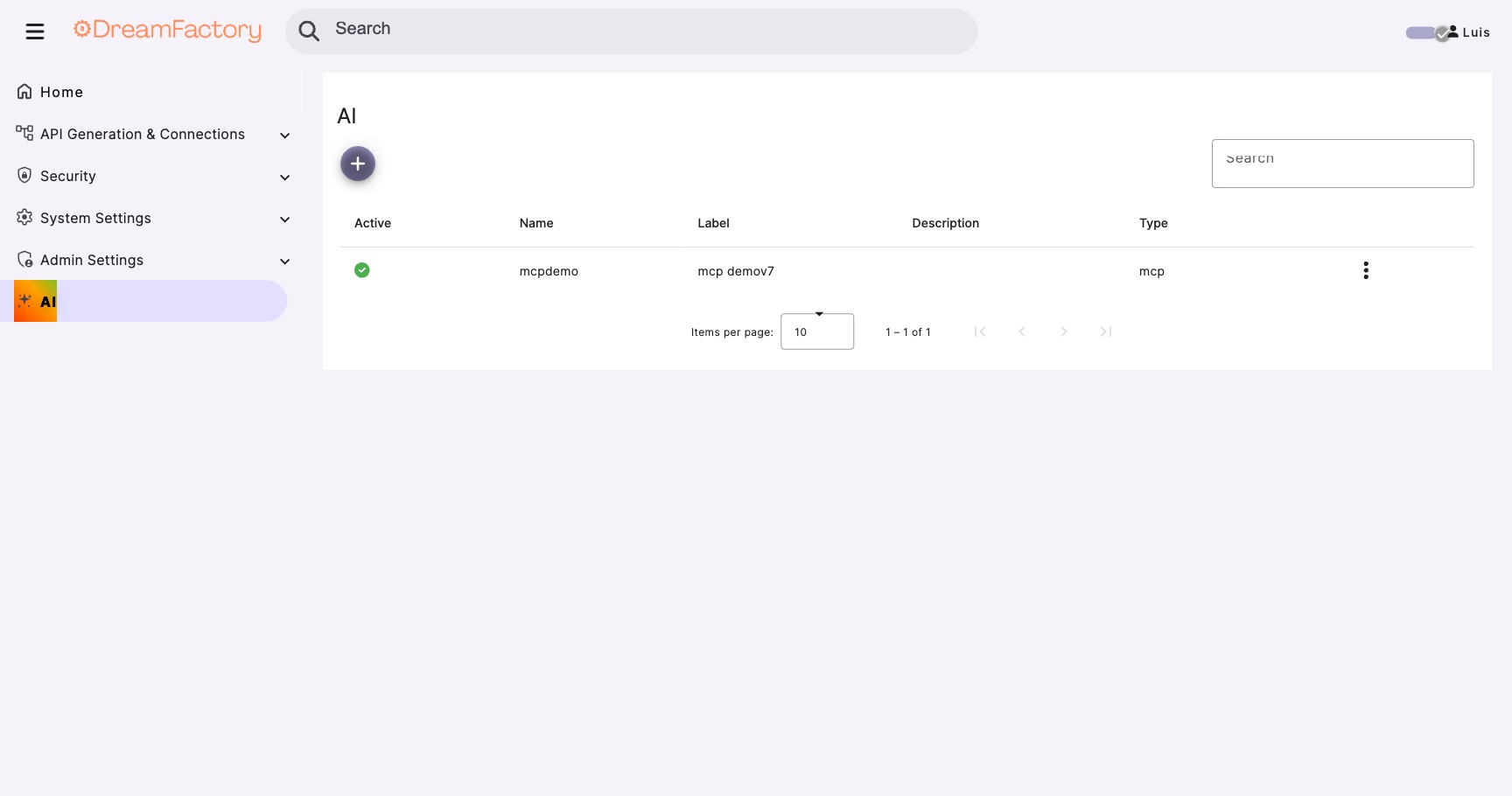
Open the AI Tab
- Log into DreamFactory as an administrator
- Click the AI tab in the admin panel
- Click the purple + button
- Select MCP Server Service
Version Check
If you don't see the AI tab, verify you're running DreamFactory 7.4 or higher. The MCP feature was introduced in version 7.4.
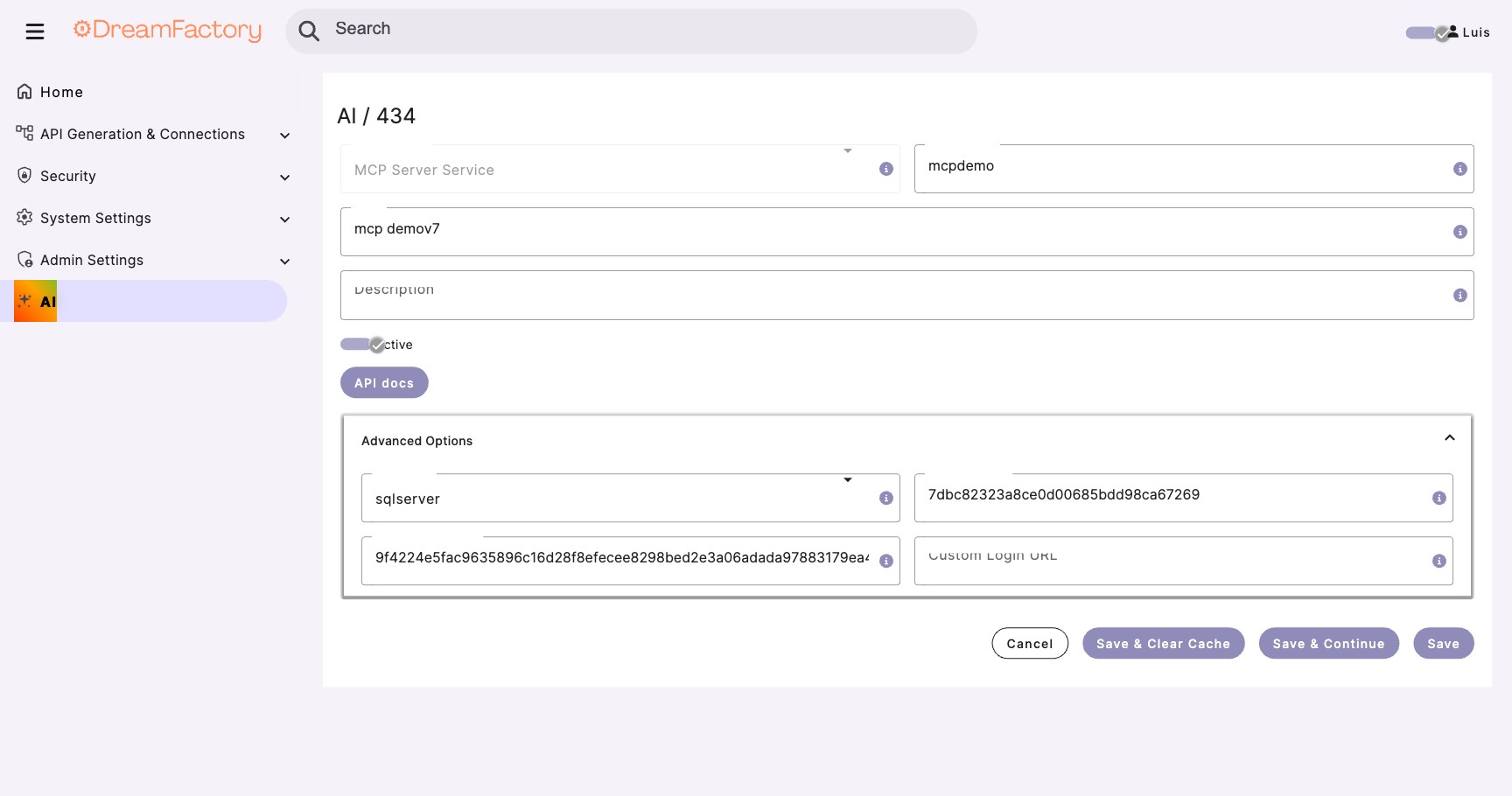
Configure the MCP Service
Fill in the service details. The MCP endpoint will be available at /mcp/{your-api-namespace}.
API Namespace:  my-ai-service    // becomes /mcp/my-ai-service
Label:          My AI Service
Description:    MCP server for AI access to enterprise data

// Protocol details (auto-configured)
Transport:      Streamable HTTP
Protocol:       JSON-RPC 2.0
Version:        2025-03-26
Save and Get Credentials
Click Save. DreamFactory automatically generates OAuth 2.0 credentials:
Client ID:      auto-generated-unique-id
Client Secret:  auto-generated-keep-secret
Endpoint:       /mcp/my-ai-service
Auto-Discovery Enabled
The MCP service automatically discovers all your configured database and file storage services. You don't need to configure each one individually; one MCP service covers everything.
Protect Your Credentials
The Client ID and Client Secret grant OAuth access to your data. Share them securely with AI client users. Store secrets using environment variables or a secrets manager, and never commit them to version control.
Step 2 Verify Service Discovery
Your MCP service automatically discovers all database and file storage services configured in DreamFactory. No manual per-service setup is required.
Check Connected Services
- Navigate to AI tab and select your MCP service
- DreamFactory auto-discovers all database and file storage services
- Use the
list_apistool from any MCP client to verify what's exposed - Each service's tools are prefixed with the API name (e.g.,
mysql_,s3_)
{
  "apis": [
    {
      "name": "salesdb",
      "type": "database",
      "description": "Sales database (MySQL)"
    },
    {
      "name": "documents",
      "type": "file_storage",
      "description": "Document storage (S3)"
    }
  ]
}
Recommended First Step
After connecting, call salesdb_get_data_model to get a condensed overview of all tables, columns, foreign keys, and row counts. This gives the AI a complete picture of your schema in a single call.
Configure Column-Level Access
For finer control, you can specify which columns AI can see for each table:
{
  "table_configs": {
    "customers": {
      "allowed_columns": [
        "id",
        "first_name",
        "last_name",
        "email",
        "city",
        "state",
        "created_at"
      ],
      // Sensitive columns hidden from AI
      "blocked_columns": [
        "ssn",
        "credit_card_last4",
        "internal_notes"
      ]
    },
    "orders": {
      "allowed_columns": "*",
      "blocked_columns": ["payment_token"]
    }
  }
}
Expose Stored Procedures
Stored procedures are the recommended way to allow AI write operations. They provide controlled, validated mutations.
{
  "procedures": {
    "mcp_enabled": true,
    "allowed_procedures": [
      {
        "name": "create_order",
        "description": "Create a new order for a customer",
        "parameters": [
          {"name": "customer_id", "type": "integer", "required": true},
          {"name": "product_ids", "type": "array", "required": true},
          {"name": "notes", "type": "string", "required": false}
        ]
      },
      {
        "name": "update_order_status",
        "description": "Update the status of an existing order",
        "parameters": [
          {"name": "order_id", "type": "integer", "required": true},
          {"name": "new_status", "type": "string", "required": true}
        ]
      }
    ]
  }
}
Step 3 Authentication (OAuth 2.0 + PKCE)
DreamFactory's MCP server uses OAuth 2.0 Authorization Code with PKCE (RFC 7636) for authentication, with support for Dynamic Client Registration (RFC 7591) and OAuth discovery endpoints (RFC 8414). Token lifetimes: access tokens = 1 hour, refresh tokens = 7 days, authorization codes = 10 minutes. When you create an MCP service (Step 1), credentials are auto-generated. No manual API key creation or role setup is needed for basic MCP access.
How Authentication Works
The OAuth flow for MCP clients follows this sequence:
- Client initiates an OAuth request to
/mcp/{service}/authorize - User authenticates via the login page (default or custom)
- Authorization code is returned to the client
- Token exchange at
/mcp/{service}/tokenprovides access - MCP session begins with authenticated access to data
No Auth Headers Needed in MCP Requests
Once authenticated, DreamFactory handles service configuration and credential management internally. You don't need to include authentication headers like X-DreamFactory-API-Key in your MCP tool calls because the session handles it.
Share Credentials with AI Client Users
From the MCP service you created in Step 1, share these with your AI client users:
MCP Endpoint:   https://your-instance.com/mcp/my-ai-service
Client ID:      (from MCP service settings)
Client Secret:  (from MCP service settings)
Protect Your Client Secret
The Client Secret grants OAuth access to your data. Distribute it securely and store it using environment variables or a secrets manager. Never commit secrets to version control.
Custom Login Page (Optional)
DreamFactory supports custom/white-label login pages for MCP OAuth. This lets you brand the login experience while maintaining OAuth 2.0 + PKCE security.
- Navigate to AI > your MCP service > Advanced Options
- Set the Custom Login URL (e.g.,
https://login.yourcompany.com/) - Your custom page receives OAuth parameters via query string and submits credentials back to DreamFactory
The custom login page also supports social login (OAuth providers) via a Base64-encoded oauth_services parameter. See the official Custom Login Page docs for the complete implementation guide with working HTML example.
Key OAuth Endpoints
/mcp/{service}/authorize: Start OAuth flow
/mcp/{service}/login: Submit credentials
/mcp/{service}/token: Exchange code for tokens
Step 4 Test with MCP Inspector
The MCP Inspector is a debugging tool that lets you verify your MCP server configuration before connecting AI clients.
Install MCP Inspector
# Install MCP Inspector globally
npm install -g @modelcontextprotocol/inspector

# Or use npx to run without installing
npx @modelcontextprotocol/inspector
Connect to DreamFactory
# Set your DreamFactory MCP endpoint
export DF_URL="https://your-dreamfactory-instance.com"
export MCP_SERVICE="my-ai-service"

# Launch inspector connected to DreamFactory MCP
npx @modelcontextprotocol/inspector \
  --url "${DF_URL}/mcp/${MCP_SERVICE}"
Verify Tool Discovery
In the Inspector UI, you should see the tools exposed by your MCP configuration:
{
  "tools": [
    {
      "name": "salesdb_get_data_model",
      "description": "Get condensed schema overview including tables, columns, foreign keys, and row counts"
    },
    {
      "name": "salesdb_get_tables",
      "description": "Retrieve a list of all available tables in the sales database"
    },
    {
      "name": "salesdb_get_table_data",
      "description": "Query table data with filtering, pagination, and sorting",
      "inputSchema": {
        "type": "object",
        "properties": {
          "table_name": {"type": "string"},
          "filter": {"type": "string"},
          "limit": {"type": "integer", "default": 100}
        },
        "required": ["table_name"]
      }
    },
    {
      "name": "salesdb_aggregate_data",
      "description": "Compute SUM, COUNT, AVG, MIN, MAX aggregations"
    },
    {
      "name": "salesdb_call_stored_procedure",
      "description": "Execute a stored procedure with custom parameters"
    }
  ]
}
Test a Query
Use the Inspector to execute a test query:
{
  "name": "salesdb_get_table_data",
  "arguments": {
    "table_name": "customers",
    "limit": 5,
    "fields": "id,first_name,last_name,email"
  }
}
Expected Response
You should see customer records returned. If you get an error, check: (1) API key is correct, (2) Role has proper permissions, (3) MCP is enabled for the service, (4) Table is in allowed_tables list.
🐍 Python Client Integration
Connect your Python applications to DreamFactory MCP using the official MCP SDK.
Install Dependencies
pip install mcp anthropic python-dotenv
Create MCP Client
import os
import asyncio
from mcp import ClientSession
from mcp.client.streamable_http import streamablehttp_client
from dotenv import load_dotenv

load_dotenv()

class DreamFactoryMCPClient:
    """Client for interacting with DreamFactory via MCP protocol."""

    def __init__(self):
        self.url = os.getenv("DREAMFACTORY_URL")
        self.service = os.getenv("MCP_SERVICE_NAME", "my-ai-service")
        self.mcp_endpoint = f"{self.url}/mcp/{self.service}"
        self.session = None
        self.tools = []

    async def connect(self):
        """Establish MCP connection to DreamFactory."""

        # Create Streamable HTTP client connection
        # Auth is handled via OAuth 2.0 - no API key headers needed
        self.transport = streamablehttp_client(self.mcp_endpoint)
        read_stream, write_stream = await self.transport.__aenter__()

        # Initialize MCP session (protocol version 2025-03-26)
        self.session = ClientSession(read_stream, write_stream)
        await self.session.__aenter__()
        await self.session.initialize()

        # Discover available tools
        tools_response = await self.session.list_tools()
        self.tools = tools_response.tools

        print(f"Connected! Available tools: {len(self.tools)}")
        for tool in self.tools:
            print(f" - {tool.name}: {tool.description}")

        return self

    async def get_data_model(self, api_prefix: str):
        """Get condensed schema overview - recommended first call."""
        result = await self.session.call_tool(
            f"{api_prefix}_get_data_model",
            arguments={}
        )
        return result.content

    async def query_table(self, api_prefix: str, table: str, filter: str = None, limit: int = 100):
        """Query a database table through MCP."""
        arguments = {
            "table_name": table,
            "limit": limit
        }
        if filter:
            arguments["filter"] = filter

        result = await self.session.call_tool(
            f"{api_prefix}_get_table_data",
            arguments=arguments
        )
        return result.content

    async def call_procedure(self, api_prefix: str, procedure: str, params: dict):
        """Execute a stored procedure."""
        result = await self.session.call_tool(
            f"{api_prefix}_call_stored_procedure",
            arguments={
                "procedure_name": procedure,
                "params": params
            }
        )
        return result.content

    async def close(self):
        """Close the MCP connection."""
        if self.session:
            await self.session.__aexit__(None, None, None)
        if self.transport:
            await self.transport.__aexit__(None, None, None)


# Example usage
async def main():
    client = DreamFactoryMCPClient()
    await client.connect()

    # Get data model overview (recommended first step)
    model = await client.get_data_model("salesdb")
    print("Data model:", model)

    # Query customers
    customers = await client.query_table(
        "salesdb", "customers",
        filter="state='CA'",
        limit=10
    )
    print("California customers:", customers)

    # Call a stored procedure
    result = await client.call_procedure(
        "salesdb", "create_order",
        {"customer_id": 123, "product_ids": [1, 2, 3]}
    )
    print("Order created:", result)

    await client.close()

if __name__ == "__main__":
    asyncio.run(main())
Integrate with Claude
import os
import asyncio
import json
from anthropic import Anthropic
from dreamfactory_mcp_client import DreamFactoryMCPClient

client = Anthropic()

async def process_user_query(user_message: str):
    """Process a natural language query using Claude and DreamFactory."""

    # Connect to DreamFactory MCP
    df_client = DreamFactoryMCPClient()
    await df_client.connect()

    # Get available tools and schema for Claude
    schema = await df_client.get_schema()

    # Convert MCP tools to Claude's tool format
    tools = []
    for tool in df_client.tools:
        tools.append({
            "name": tool.name,
            "description": tool.description,
            "input_schema": tool.inputSchema
        })

    # Initial message to Claude with context
    messages = [
        {
            "role": "user",
            "content": f"""You have access to a sales database with the following schema:
{json.dumps(schema, indent=2)}

User question: {user_message}

Use the available tools to answer the user's question."""
        }
    ]

    # Call Claude with tools
    response = client.messages.create(
        model="claude-sonnet-4-20250514",
        max_tokens=4096,
        tools=tools,
        messages=messages
    )

    # Process tool calls
    while response.stop_reason == "tool_use":
        tool_results = []

        for content in response.content:
            if content.type == "tool_use":
                # Execute the tool via MCP
                result = await df_client.session.call_tool(
                    content.name,
                    arguments=content.input
                )

                tool_results.append({
                    "type": "tool_result",
                    "tool_use_id": content.id,
                    "content": json.dumps(result.content)
                })

        # Continue conversation with tool results
        messages.append({"role": "assistant", "content": response.content})
        messages.append({"role": "user", "content": tool_results})

        response = client.messages.create(
            model="claude-sonnet-4-20250514",
            max_tokens=4096,
            tools=tools,
            messages=messages
        )

    await df_client.close()

    # Return Claude's final response
    return response.content[0].text


# Example
async def main():
    answer = await process_user_query(
        "What are our top 5 customers by order value this quarter?"
    )
    print(answer)

if __name__ == "__main__":
    asyncio.run(main())
💻 Claude Desktop Integration
Claude Desktop can connect directly to DreamFactory's MCP server, allowing you to query your databases through natural conversation.
Locate Claude Desktop Config
Find your Claude Desktop configuration file:
# macOS
~/Library/Application Support/Claude/claude_desktop_config.json

# Windows
%APPDATA%\Claude\claude_desktop_config.json

# Linux
~/.config/Claude/claude_desktop_config.json
Add DreamFactory MCP Server
Edit the configuration file to add DreamFactory as an MCP server:
{
  "mcpServers": {
    "dreamfactory": {
      "command": "npx",
      "args": [
        "-y",
        "@anthropic/mcp-proxy",
        "--url",
        "https://your-dreamfactory-instance.com/mcp/my-ai-service"
      ],
      "env": {}
    }
  }
}
OAuth Authentication
Claude Desktop handles the OAuth 2.0 + PKCE flow automatically. You'll be prompted to log in when the connection is first established. No API keys need to be stored in the config file.
Using Environment Variables (Recommended)
For better security, use environment variables:
{
  "mcpServers": {
    "dreamfactory": {
      "command": "npx",
      "args": [
        "-y",
        "@anthropic/mcp-proxy",
        "--url",
        "${DREAMFACTORY_URL}/mcp/${MCP_SERVICE}"
      ],
      "env": {
        "DREAMFACTORY_URL": "https://your-dreamfactory-instance.com",
        "MCP_SERVICE": "my-ai-service"
      }
    }
  }
}
Restart and Test
- Restart Claude Desktop to load the new configuration
- Open a new conversation
- Type a question about your data, like: "Show me the top 10 customers by order value"
- Claude will use the DreamFactory MCP tools to query your database and respond
Verification
You can verify the connection by asking Claude: "What database tools do you have access to?" Claude should list the DreamFactory tools including table queries and schema access.
✅ Best Practices
1. Start Read-Only
Begin with GET-only Access
When first setting up MCP, enable only read operations. Observe how AI interacts with your data before enabling any write capabilities. This allows you to understand query patterns and potential risks without data mutation concerns.
2. Use Stored Procedures for Writes
Controlled Mutations
Instead of enabling direct INSERT/UPDATE/DELETE, expose stored procedures for write operations. This gives you:
- Input validation at the database level
- Business logic enforcement
- Atomic transactions
- Audit trail within the procedure
3. Implement Rate Limiting
{
  "rate_limits": {
    // Per API key limits
    "api_key": {
      "requests_per_minute": 30,
      "requests_per_hour": 500
    },
    // Per table limits
    "table_specific": {
      "customers": {"requests_per_minute": 20},
      "orders": {"requests_per_minute": 50}
    }
  }
}
4. Monitor and Audit
- Enable detailed logging for all MCP requests
- Set up alerts for unusual query patterns
- Regularly review access logs
- Track which tables and columns AI queries most frequently
5. Use Descriptive Tool Names
Help AI Choose the Right Tool
Good descriptions help AI understand when to use each tool:
Poor: "get_records: Gets records"
Good: "get_customer_orders: Retrieve order history for a specific customer including order dates, totals, and status"
6. Limit Result Set Sizes
MCP Pagination Limits: Critical for AI Token Management
The MCP server enforces a hard limit of 1,000 records per request, compared to the platform default of 100,000 (DB_MAX_RECORDS_RETURNED). This is intentional because large result sets consume excessive AI tokens. Use {db}_aggregate_data for analytics (SUM, COUNT, AVG, MIN, MAX with GROUP BY) instead of fetching raw rows. The aggregation tool handles pagination internally for large datasets.
{
  "query_settings": {
    // Default if not specified
    "default_limit": 100,

    // MCP hard maximum - 1,000 per request (platform default: 100,000)
    "max_limit": 1000,

    // Warn if large result set
    "warn_threshold": 500
  }
}
🔧 Troubleshooting
Connection Refused / Timeout
Symptoms: MCP client cannot connect to DreamFactory.
Causes:
- DreamFactory server not running
- Incorrect URL (check HTTPS vs HTTP)
- Firewall blocking connection
- MCP endpoint not enabled
Solution: Verify DreamFactory is running, check the URL includes the correct protocol and port (e.g., https://your-instance.com/mcp/my-ai-service), ensure the MCP service is active in the AI tab.
401 Unauthorized
Symptoms: Connection established but requests fail with 401.
Causes:
- Invalid or expired OAuth token
- Client ID or Client Secret incorrect
- MCP service not active
Solution: Verify Client ID and Client Secret from your MCP service settings. Re-authenticate via the OAuth flow. Ensure the MCP service is active in the AI tab.
403 Forbidden on Tool Call
Symptoms: Tools are discovered but calls return 403.
Causes:
- Role doesn't have permission for requested service
- Table not in allowed_tables list
- Verb not allowed (e.g., trying POST when only GET is enabled)
Solution: Review role configuration, verify table is exposed for MCP, check verb mask includes required operation.
Empty Tool List
Symptoms: Connection works but no tools are returned.
Causes:
- No database or file storage services configured in DreamFactory
- MCP service not properly saved
- Service connection issues
Solution: Ensure at least one database or file storage service is configured in DreamFactory. The MCP service auto-discovers all connected services. Verify the service connections are active.
Slow Query Response
Symptoms: Queries take very long or timeout.
Causes:
- Large result sets without LIMIT
- Missing database indexes
- Complex queries without optimization
- Network latency
Solution: Enable default_limit in MCP settings, review database query plans, add appropriate indexes, consider caching frequently accessed data.
Debug Logging
Enable verbose logging to diagnose issues:
# Enable detailed MCP logging
MCP_LOG_LEVEL=debug
MCP_LOG_REQUESTS=true
MCP_LOG_RESPONSES=true

# Log to file
MCP_LOG_FILE=/var/log/dreamfactory/mcp.log
Health Check Endpoint
Test MCP server health:
curl -X POST "https://your-df-instance.com/mcp/my-ai-service" \
  -H "Content-Type: application/json" \
  -d '{"jsonrpc": "2.0", "method": "initialize", "id": 1, "params": {"protocolVersion": "2025-03-26", "clientInfo": {"name": "health-check", "version": "1.0.0"}}}'
Expected response:
{
  "jsonrpc": "2.0",
  "id": 1,
  "result": {
    "protocolVersion": "2025-03-26",
    "serverInfo": {
      "name": "dreamfactory-mcp",
      "version": "1.0.0"
    },
    "capabilities": {
      "tools": {}
    }
  }
}